

Let's start with three numbers. 53% of mobile users abandon a website that takes longer than 3 seconds to load. A 1-second delay in page load time causes a 7% reduction in conversions. And Amazon once estimated that every additional second of load time would cost them $1.6 billion per year in lost sales.
Your website isn't Amazon. But the maths scales down proportionally. If your site earns €10,000/month and it loads in 5 seconds instead of 2, you're leaving roughly €700-1,400/month on the table. Not because your product is bad. Not because your marketing is wrong. Because people clicked the back button before your page finished loading.
Speed isn't a nice-to-have. Since 2021, Google has made Core Web Vitals a ranking factor. Slow sites rank lower. And since 2023, the gap has widened — Google's own research shows that when page load time goes from 1 second to 3 seconds, the probability of a bounce increases by 32%. When it goes to 5 seconds, that probability jumps to 90%.
Core Web Vitals: The Three Metrics Google Actually Measures
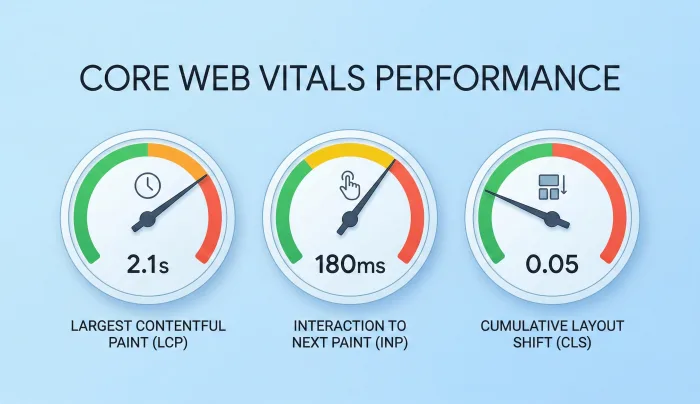
Google doesn't just measure "speed" as a single number. They track three specific metrics, and each one tells a different story about your user's experience.
LCP (Largest Contentful Paint) — How long until the main content is visible. Target: under 2.5 seconds. This measures when the largest element on the page (usually a hero image or headline block) finishes rendering. If your hero image is a 3MB uncompressed JPEG, your LCP will be terrible.
INP (Interaction to Next Paint) — How quickly your page responds to clicks, taps, and keyboard input. Target: under 200 milliseconds. This replaced FID (First Input Delay) in March 2024. It measures the full delay between a user action and the visual response. Heavy JavaScript frameworks and third-party scripts are the usual culprits.
CLS (Cumulative Layout Shift) — How much the page jumps around while loading. Target: under 0.1. You know the experience: you're about to tap a link and an ad loads above it, pushing everything down. That's layout shift. It's infuriating, and Google penalises it.
How to Check Your Current Speed
Before you fix anything, measure. There are two free tools you should use:
Google PageSpeed Insights (pagespeed.web.dev) — Enter your URL and it gives you scores for both mobile and desktop, plus specific recommendations. Pay attention to the "Opportunities" section — it tells you exactly what's slowing you down and estimates the time savings.
Google Search Console — Under "Core Web Vitals" in the left menu, you'll see how many of your pages pass or fail Google's thresholds. This uses real user data from Chrome browsers, so it reflects actual visitor experience, not a lab test.
A score of 90+ on PageSpeed Insights is good. 50-89 needs work. Below 50 means you're actively losing customers and ranking positions.
The Fixes That Make the Biggest Difference
Here are the optimisations ranked by impact. Start at the top.
1. Optimise your images (biggest win for most sites)
Images are typically 50-70% of a page's total weight. The fix is straightforward:
- Convert images to WebP or AVIF format. WebP is 25-35% smaller than JPEG at the same quality. AVIF is 50% smaller.
- Resize images to the dimensions actually displayed. If your image displays at 700px wide, don't upload a 4000px original. Resize it to 1400px (for retina) and let the browser handle the rest.
- Use lazy loading for images below the fold. Add `loading="lazy"` to any image not visible on the initial screen. This means the browser only downloads the image when the user scrolls near it.
- Use responsive images with the `srcset` attribute so mobile users download smaller files than desktop users.
For most websites, image optimisation alone improves LCP by 1-3 seconds.
2. Reduce JavaScript
Every JavaScript file needs to be downloaded, parsed, compiled, and executed. Each step takes time. And most websites load far more JavaScript than they need.
- Remove scripts you don't use. That social sharing widget nobody clicks? The analytics tool you set up and forgot? The chat widget that loads 400KB of code? Audit your scripts and remove anything non-essential.
- Defer non-critical scripts. Add `defer` or `async` to script tags that aren't needed for the initial page render. Analytics, chat widgets, and social scripts can all load after the page is visible.
- Use a modern framework wisely. React, Next.js, and similar frameworks can be fast — but only if you use server-side rendering and code splitting. A poorly configured React app can send 500KB+ of JavaScript to the browser before anything renders.
3. Use a CDN (Content Delivery Network)
A CDN stores copies of your website on servers around the world. When a user in Tokyo visits your site hosted in Barcelona, the CDN serves the page from a server in Tokyo — cutting load time by 50-70%.
Popular CDN options: Cloudflare (free tier is excellent), AWS CloudFront, Bunny.net. Setup takes 15-30 minutes for most websites.
4. Enable browser caching
When someone visits your site for the first time, their browser downloads everything: HTML, CSS, JavaScript, images. Caching tells the browser to save those files locally so repeat visits load almost instantly.
Set cache headers to store static assets (images, CSS, fonts) for at least 30 days. Dynamic content (HTML) should have shorter cache times — a few hours or a day.
5. Minimise CSS and HTML
Remove unused CSS rules (most sites have 30-50% unused CSS), minify your stylesheets, and inline critical CSS so the browser can render the page structure immediately.
Tools like PurgeCSS or the Coverage tab in Chrome DevTools will show you exactly which CSS rules are unused on each page.
6. Fix layout shift (CLS)
Layout shift usually comes from three sources:
- Images without width/height attributes. Always set explicit dimensions so the browser reserves space before the image loads.
- Fonts loading late. Use `font-display: swap` in your CSS and preload your primary font file.
- Dynamic content injected above the fold. Ads, banners, and cookie notices that push content down. Reserve space for these elements in your CSS.
The Mobile Speed Gap
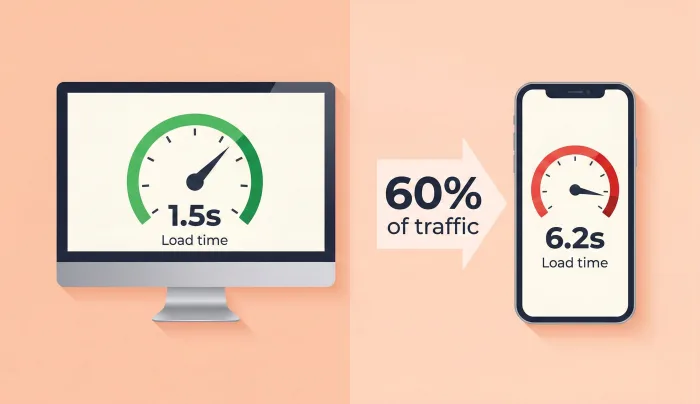
Most people check their website speed on their office computer with a fast internet connection. But 60% of web traffic is mobile, and mobile speeds are dramatically slower.
Google's speed test uses a simulated mobile connection throttled to roughly 4G speeds. What loads in 1.5 seconds on your desktop might take 6 seconds on a phone. And remember — 53% of mobile visitors leave if it takes more than 3 seconds.
Always test mobile speed specifically. Your mobile score on PageSpeed Insights is the one that matters most for SEO.
Speed and AI Search
Here's something most people haven't considered: page speed indirectly affects your visibility in AI search too. Perplexity, Google's AI Overviews, and Bing's Copilot all favour sources that load quickly and have clean HTML. When an AI crawler hits your site and it takes 8 seconds to render because of JavaScript-heavy rendering, the crawler may not wait — and you won't get cited.
Clean, fast, server-rendered HTML is easier for both search engine crawlers and AI systems to parse. Speed improvements help everywhere.
A Realistic Speed Improvement Plan
You don't need to do everything at once. Here's a 4-week plan:
Week 1: Run PageSpeed Insights on your 5 most important pages. Convert all images to WebP and add lazy loading to below-the-fold images.
Week 2: Audit your JavaScript. Remove unused scripts, defer non-critical ones. Set up a free Cloudflare CDN.
Week 3: Add explicit width/height to all images. Fix font loading. Reserve space for dynamic elements.
Week 4: Enable browser caching. Minify CSS. Re-test all 5 pages and compare to your Week 1 baseline.
Most businesses that follow this plan see a 40-60% improvement in load time within a month. That typically means 1-2 seconds faster, which directly translates to more visitors staying, more pages viewed, and more conversions.
The fastest site doesn't always win. But the slowest site always loses. If your competitors load in 2 seconds and you load in 5, you're starting every race three seconds behind.
Need help diagnosing speed issues? We audit websites for performance bottlenecks and implement fixes — from image optimisation to full architectural improvements.